
What's New in Planetaro 2026.6
Planetaro 2026.6 is available on the App Store.Planetaro 2026.6 is a Moon release. The Moon screen now tells you where you are in the lunar cycle and what comes next, on one timeline: the next void of course, the next sign change and the coming phases. Planetaro can notify you of each of those. The widgets are fixed and draw correctly on the tinted Home Screen. And the app is ready for iPhone Duo: open it in landscape and the main screen and the Moon screen split into two panes. This release is for iPhone and iPad.
Everything new in Planetaro 2026.6 at a glance
- The Moon screen shows the day of the cycle and the next phase, right next to the Moon
- A new Upcoming row puts the next void of course, the next sign change and the coming phases on one timeline
- Moon & Zodiac notifications for void of course, sign changes and exact phases
- Redesigned phase cards with the countdown up front
- A precise time scrubber anchored to real hours, with a gentle tick as you pass each one
- 12-hour / 24-hour time format and notification sounds, including spoken planet names
- Widgets fixed: reliable timelines, correct icons on the tinted Home Screen, countdown or date for Moon phases
- Ready for iPhone Duo: two-pane layouts when the phone is open in landscape
- Also: steadier numbers everywhere, a one-line Pro row in Settings, and a switch to hide the podcast card for good
What changed on the Moon screen?
The Moon screen used to answer "what phase is it?" and stop there. Planetaro 2026.6 makes it answer "what comes next?"
Day of the cycle and the next phase. Under the phase name and illumination, the Moon card now says which day of the 29-day cycle you are in and how far the next phase is, for example "Day 14 of 29 · Full Moon in 1 day".
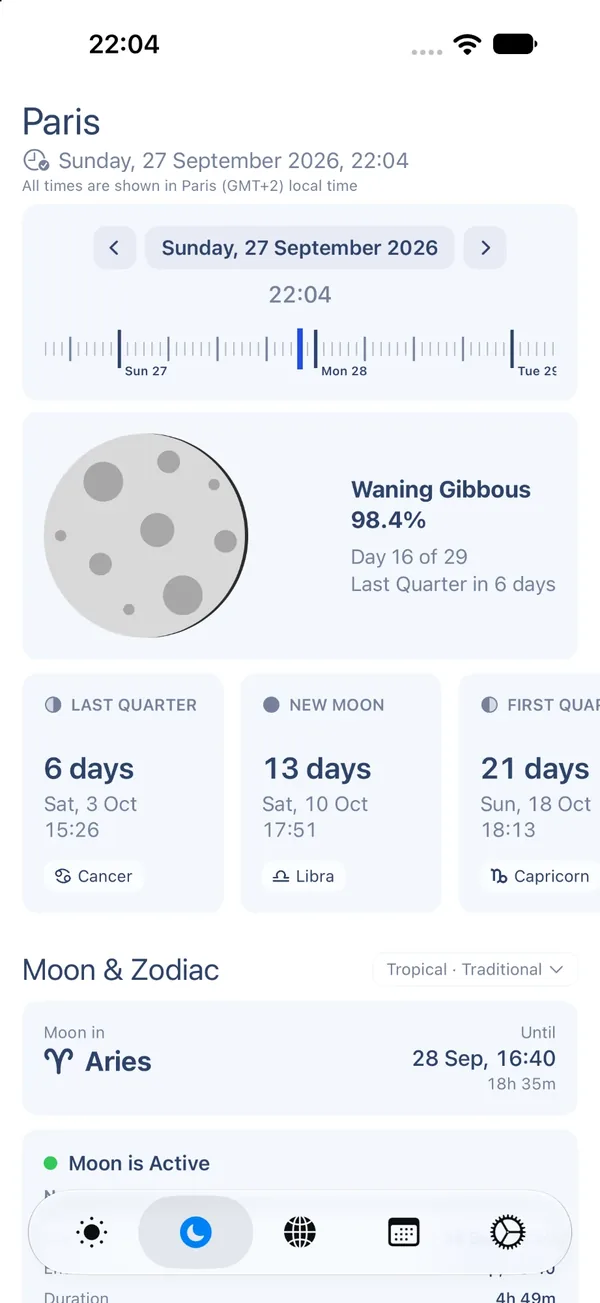
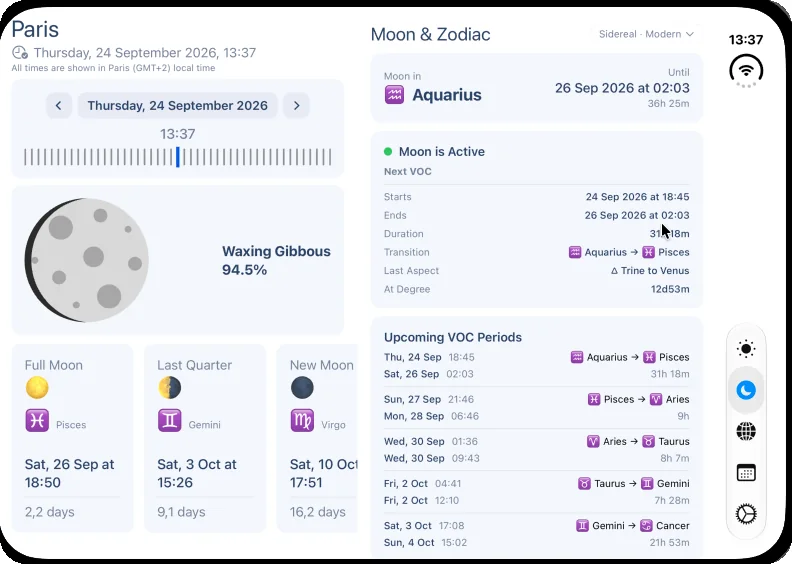
Upcoming. A new row of cards lists what the Moon does next, in order: the next void of course with the degree it starts at, the next sign change, and the coming phases with the Moon's sign at that moment. Each card carries a countdown. Before, the same information sat in three different places on the screen.
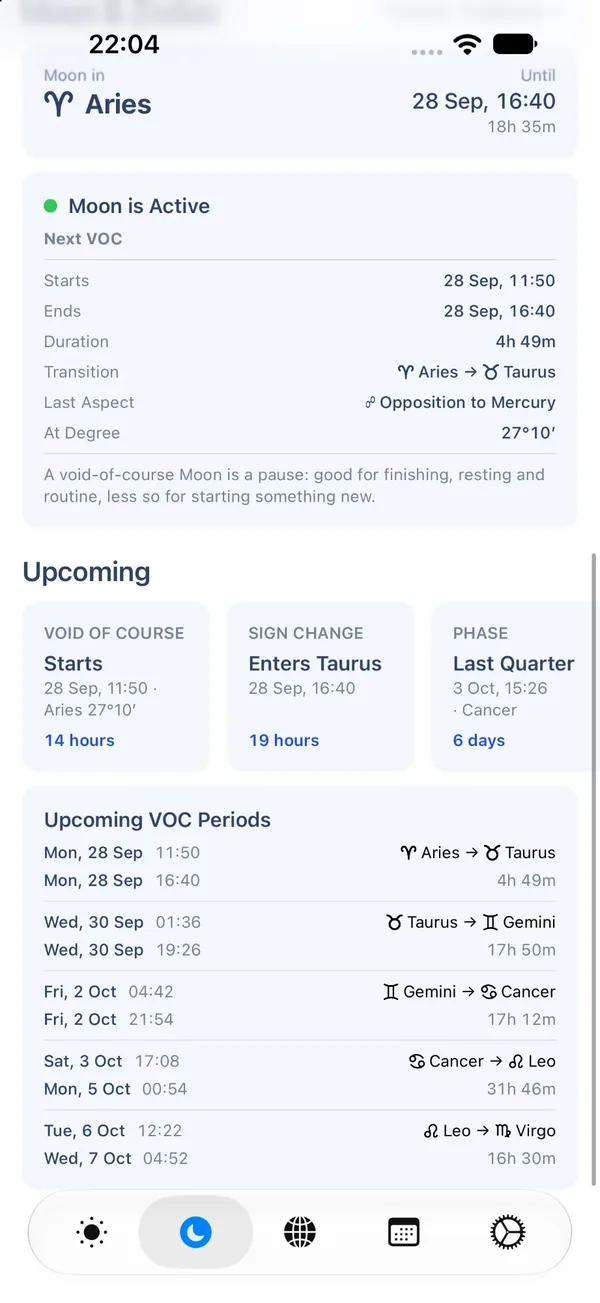
Phase cards. The four phase cards are redesigned: a small phase mark and title on top, the countdown as the big figure, the exact day and time under it, and the Moon's sign as a chip. They keep their shape at larger text sizes.
Void of course. Degrees now read as 28°57′ instead of 28d57m, dates drop the year, and a one-line note reminds you what a void Moon is good for: finishing, resting and routine, less so for starting something new.
The time scrubber. The scrubber under the date is anchored to real hours now. Hour, six-hour and midnight ticks have different weights, each midnight tick carries its day, and a gentle haptic tick marks every hour you pass, a firmer one at midnight. Dragging is precise again: it no longer sped up under a moving finger, a long-standing bug.
What are the Moon & Zodiac notifications?
Settings, then Notifications, now has a Moon section. Planetaro can notify you when the Moon goes void of course (and when the void ends), when it changes sign, and at the exact moment of a new moon, first quarter, full moon or last quarter. Notifications are scheduled 30 days ahead from your saved location's timezone, and they share the iOS notification budget with your planetary hour alerts, so the app keeps the total within what iOS allows.
What is new for planetary hours?
Time format. Settings has a Time Format option: Automatic follows the system, or choose 12-hour or 24-hour regardless of the system clock.
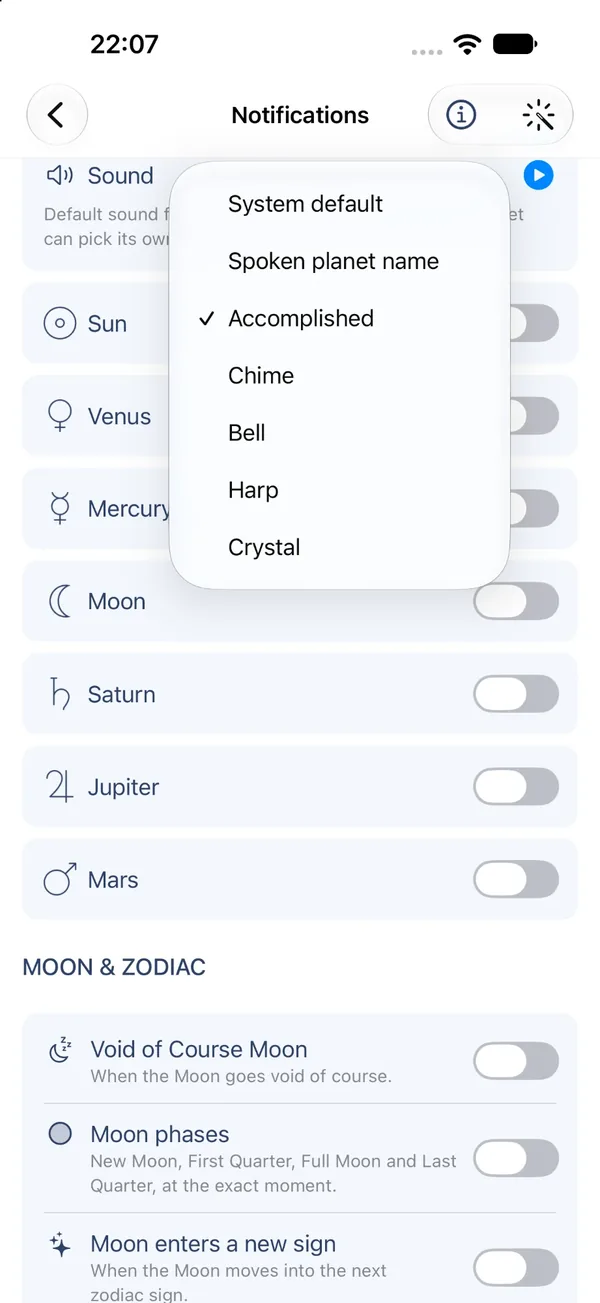
Notification sounds. Each planetary hour alert can play the spoken name of the planet, one of four short melodies, or the standard system sound, and you can set this once for all planets or separately per planet. Every sound can be previewed in Settings.
What was wrong with the widgets, and what is fixed?
Two readers wrote in August to say their widgets had stopped working. We found the cause: on some devices the Moon lookups behind the widget took seconds instead of milliseconds, and iOS gave up on the widget's timeline, which left it blank or stuck. Planetaro 2026.6 makes those lookups about 200,000 times faster, never returns an empty timeline, and, when a widget cannot show anything, says why: it needs your location, or it needs Planetaro Pro.
Also fixed on the widgets:
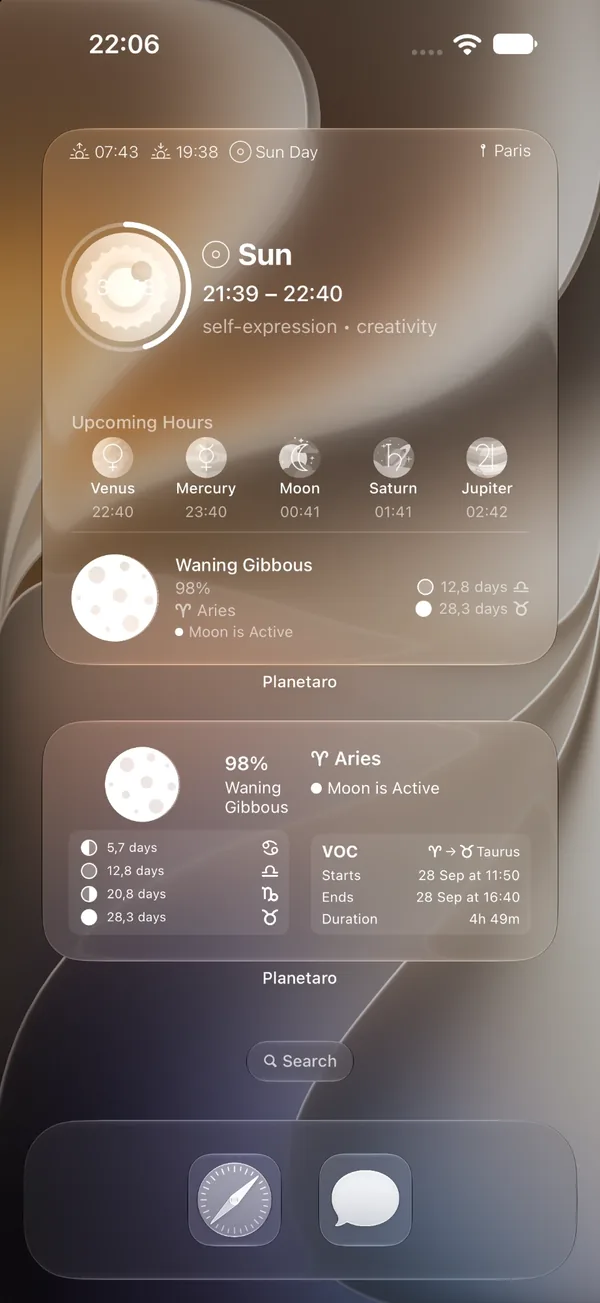
- Zodiac signs and Moon phases now draw correctly on the tinted Home Screen (iOS 18 and later). They were emoji, which the tinted mode blanks out; they are icons now, in the app as well as in the widgets.
- Moon phase dates can be shown as a countdown or as the actual date and time, under Settings, then Customize Widget.
- The Moon in the widget is drawn as of now, not as of the start of the planetary hour, and its illumination is a whole percent.
What does "ready for iPhone Duo" mean?
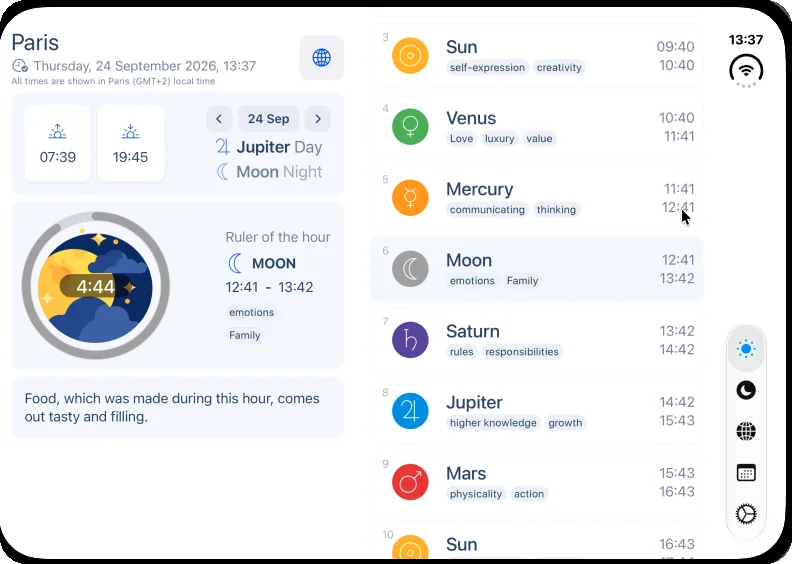
iPhone Duo, Apple's folding iPhone, has an inner display that is as wide as it is tall when the phone is open. Planetaro uses that space when you hold the open phone in landscape: the main screen puts today's summary on the left and all 24 planetary hours on the right, in the theme you chose, and the Moon screen puts the phase on one side and the sign and void-of-course section on the other. In portrait, and on the outer display, the screens look exactly as they do on any other iPhone. Onboarding, the paywall and the toolbars were adjusted for the Duo's side-mounted controls too.
The two-pane layout needs iOS 27.1, which iPhone Duo ships with. On every other iPhone nothing changes.
Smaller changes
- Numbers that tick, such as countdowns, times and percentages, no longer jitter, and times line up in columns.
- Your Pro status and the Restore and Manage subscription options now take one line in Settings.
- The new-episode card on the main screen can be turned off for good, under Planetaro Talk, then New episode cards. The card's own close button only hid it until the next episode, and a reader rightly pointed out that on the home screen of an app you paid for, it read as an ad.
- Onboarding and the paywall respect the safe area on every device, and the paywall scrolls under the status bar instead of being cut off.
- The main screen no longer carries an invisible gap above the title when there is no announcement or episode card to show.
Frequently Asked Questions
How do I get notified when the Moon is void of course?
Open Settings, then Notifications, and turn on the Moon options: void of course, sign changes and exact phases. Notifications are scheduled 30 days ahead for your saved location.
What does "Day 14 of 29" on the Moon screen mean?
It is the age of the Moon: how many days have passed since the last new moon, out of the 29.5-day lunar cycle. Day 1 is the new moon, day 15 is around the full moon.
Why did my widgets stop working, and are they fixed?
On some devices the Moon calculation behind the widget was too slow and iOS abandoned the widget's timeline. Planetaro 2026.6 fixes the cause and, if a widget ever has nothing to show, it now tells you why.
Why do the zodiac signs look different in the widgets?
They are icons now instead of emoji. Emoji disappear on the tinted Home Screen introduced in iOS 18; icons keep their shape and take the tint. The Moon screen in the app uses the same icons, so both match.
Does Planetaro support iPhone Duo?
Yes. When the open phone is held in landscape, the main screen and the Moon screen split into two panes. In portrait and on the outer display, Planetaro looks as it does on any iPhone. The two-pane layout needs iOS 27.1.
Can I turn off the podcast card on the main screen?
Yes. Open Settings, then Planetaro Talk, and turn off New episode cards. New episodes then appear only on the Planetaro Talk screen.
Can I choose a 12-hour or 24-hour clock in Planetaro?
Yes. Settings, then Time Format: Automatic follows your system setting, or pick 12-hour or 24-hour.
Is Planetaro 2026.6 available on Android?
Not yet. Planetaro 2026.6 is an iPhone and iPad release. Android stays on Planetaro 2026.4 and continues to be updated on its own schedule.
Download
Planetaro 2026.6 is available on the App Store. Android users can find the current release on Google Play.