
What's New in Planetaro 2026.4
Planetaro 2026.4 is available on the App Store and Google Play.Planetaro 2026.4 is a reach and trust release. The app now speaks German, Portuguese and Russian, bringing the total to ten languages. Planetaro Pro can now be bought once instead of subscribed to on iOS. A new Announcements section on iOS lets important news reach you inside the app rather than only through store release notes. And the confirmation dialogs that closed by themselves on iOS 18 and earlier now wait for you.
Everything new in Planetaro 2026.4 at a glance
- German, Portuguese and Russian, for a total of ten app languages
- Lifetime Pro, a one-time purchase that unlocks Planetaro Pro permanently, on iOS in this release
- Announcements, a new section in Settings for news that reaches you inside the app, on iOS in this release
- Fixed: the calendar and Live Activity confirmations no longer close themselves on iOS 18 and earlier
- Redesigned social links in Settings, now a single row of round icons, with Reddit added
- Fixed: the TikTok link in Settings now opens the Planetaro profile instead of only launching the TikTok app
Which languages does Planetaro support?
Planetaro 2026.4 supports ten languages: English, Turkish, German, Spanish, French, Japanese, Simplified Chinese, Arabic, Portuguese and Russian. German, Portuguese and Russian are new in this release.
The translation covers the whole app, not only the menus. The planet cards, the activity keywords under each planetary hour, the moon phase and zodiac names, the Void of Course explanations, the notification texts and the paywall are all translated. Planetaro follows the language of your device: to change it, go to Settings, then App Language, which opens the iOS language setting for Planetaro.
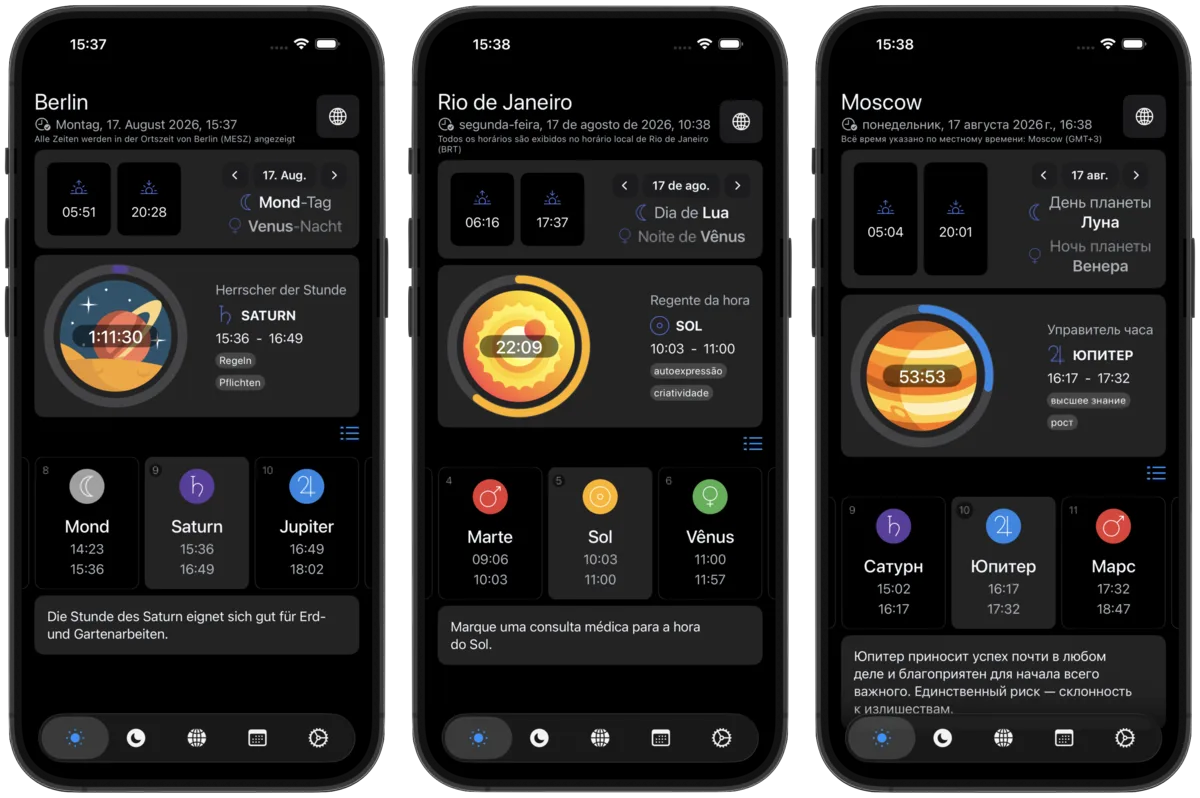
Portuguese is Brazilian Portuguese, and Russian uses the established Russian astrology vocabulary, so the Void of Course window appears as "Луна без курса" rather than a literal translation.
What is Lifetime Pro in Planetaro?
Lifetime Pro is a one-time purchase that unlocks every Planetaro Pro feature permanently. It is an alternative to the monthly and annual subscriptions, not an addition to them: it unlocks exactly the same features, and it never renews. It arrives on iOS in Planetaro 2026.4 and is coming to Android.
To find it, open the paywall from Settings, then Unlock the Full Experience, or tap any Pro feature. The monthly and annual plans stay where they were, and the lifetime option sits below them as a single line reading "or pay once".
Lifetime Pro restores like any other purchase. If you move to a new iPhone, open the paywall and tap Restore purchases.
One thing worth knowing: buying Lifetime Pro does not cancel a subscription you already have. Apple does not allow an app to cancel a subscription on your behalf, so Planetaro shows a reminder after the purchase. To cancel, go to the iOS Settings app, then your Apple Account, then Subscriptions.
What are Announcements in Planetaro?
Announcements is a new section in Settings that carries messages from the developer: an explanation when something breaks, a note about a change that surprised people, or news that does not fit in a store release note. It arrives on iOS in Planetaro 2026.4 and is coming to Android.
Until now the only way to explain something to everyone was the release notes, which most people never read, and replies to individual reviews. When the 2026.3.1 subscription fix locked Pro widgets that a bug had been leaving unlocked, there was no way to tell affected users what had actually happened. Announcements exists so that does not happen again.
When there is something to say, a strip appears at the top of the main screen. Closing it removes the strip but keeps the message: to read it again, go to Settings, then Announcements. Messages expire on their own, so the section only ever shows what is still relevant.
Announcements are informational only. Planetaro sends nothing about you to a server for this: the app downloads a small public file and decides locally whether a message applies to your app version and platform.
What changed in the Settings social links?
The five social links at the bottom of Settings were five full rows and took up about a third of the screen. In Planetaro 2026.4 they are a single row of round icons: YouTube, X, Instagram, TikTok and Reddit. The website moved into the footer next to the version number, since it is not a social account.
Reddit is new in this row. The Planetaro community is at r/Planetaro.
What was fixed in Planetaro 2026.4?
Confirmation dialogs closed themselves. On iOS 18 and earlier, adding a planetary hour to your calendar or starting a Live Activity showed a confirmation that disappeared within about a second, before you could read it or tap OK. The dialog now stays until you dismiss it. The cause was that the same confirmation was being presented from more than one screen at once, and the competing attempts cancelled each other. iOS 26 handled this correctly, which is why the problem was invisible on newer devices.
The TikTok link opened the wrong screen. Tapping TikTok in Settings launched the TikTok app but landed on the For You feed instead of the Planetaro profile. The link now opens the profile.
The paywall close button moved. The paywall used to close through a "Use without Pro features" line at the bottom, which read as a third option next to the plans. It is now a small cross in the top left corner, matching every other screen in the app.
Frequently Asked Questions
What version of Planetaro is this page about?
This page covers Planetaro 2026.4, released in August 2026 for iOS and Android.
Which languages does Planetaro 2026.4 support?
Planetaro 2026.4 supports ten languages: English, Turkish, German, Spanish, French, Japanese, Simplified Chinese, Arabic, Portuguese and Russian. German, Portuguese and Russian were added in this release, and the translation covers the planet cards, activity keywords, moon and zodiac names, notifications and the paywall.
How do I change the language in Planetaro?
Planetaro follows your device language. To change it, go to Settings, then App Language, which opens the iOS language setting for Planetaro. On Android, use the system app language setting.
Can I buy Planetaro Pro without a subscription?
Yes. Planetaro 2026.4 introduces Lifetime Pro on iOS, a one-time purchase that unlocks every Pro feature permanently and never renews. Open the paywall from Settings, then Unlock the Full Experience, and choose the "or pay once" option below the monthly and annual plans. Lifetime Pro is coming to Android.
Does buying Lifetime Pro cancel my existing Planetaro subscription?
No. Apple does not allow an app to cancel a subscription on your behalf, so an active subscription keeps renewing until you cancel it yourself. Planetaro shows a reminder after the purchase. To cancel, open the iOS Settings app, tap your Apple Account, then Subscriptions.
What is the Announcements section in Planetaro?
Announcements is a section in Settings that holds messages from the developer, such as an explanation of a change or a fix. When a new message is published, a strip appears at the top of the main screen. Closing the strip keeps the message available under Settings, then Announcements. Announcements is available on iOS in Planetaro 2026.4 and is coming to Android.
Why did my calendar confirmation disappear before I could read it?
On iOS 18 and earlier, the confirmation shown after adding a planetary hour to your calendar or starting a Live Activity closed itself after about a second. This was a bug, fixed in Planetaro 2026.4. The confirmation now stays until you dismiss it.
Download
Planetaro 2026.4 is available on the App Store and Google Play.
Bug fixes and performance improvements included.