
What's New in Planetaro 2026.3
This page covers both 2026.3 and the follow-up 2026.3.1, released on 5 August 2026. Planetaro 2026.3 is available now on the App Store and Google Play.Planetaro 2026.3 is a planning release. It adds a Planner tab that answers "when should I do this?", a World Hours map that shows which planet rules any place on Earth right now, moon sign transitions in the Moon cards and widgets, and Planetaro Talk, the app's own podcast. Notifications moved out of the tab bar and into Settings.
An honest note about the widgets
Some longtime users saw the Pro widgets lock after updating to 2026.3.1 and understandably concluded that free features had been moved behind the paywall. They were not. The update fixed a long-standing bug where an expired subscription or free trial could silently keep Pro features unlocked, in some cases for over a year. Nothing was repriced and nothing was moved: on iOS the original home screen widget has been free since 2020 and stays free, the Pro widgets have been part of Planetaro Pro since they were introduced in 2022, and on Android the widgets have been part of Pro since the app launched. We did not list the fix in the original release notes because we discovered the bug, thanks to your reviews, only after release. The full story, and what free means in Planetaro, is here: Six Years of Planetaro, and a Note About the Widgets.
Everything new in Planetaro 2026.3 at a glance
- Planner tab for finding the right planetary hour by date, city, and activity
- World Hours map as its own tab, with favourite cities as live planet pins
- Void of Course card in the Planner, showing overnight and next-day VOC periods
- Moon day navigation with arrows and a tappable date
- Zodiac sign at every moon phase in the Moon cards and widgets, with a shorter countdown
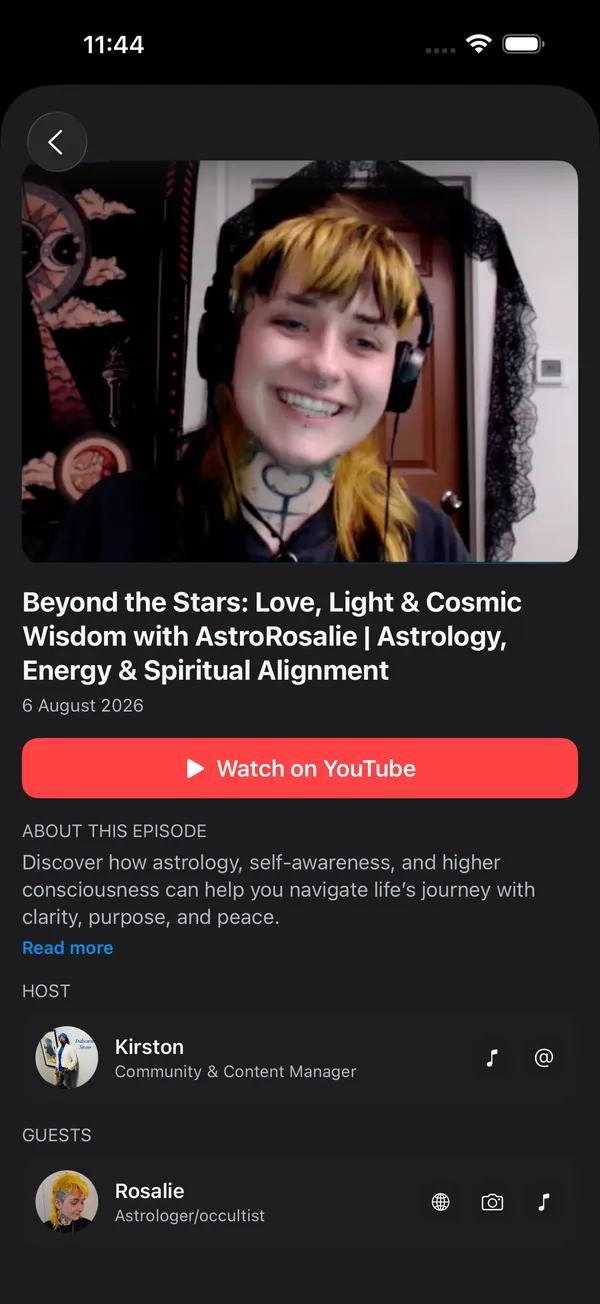
- Planetaro Talk podcast inside the app, under Settings and Community
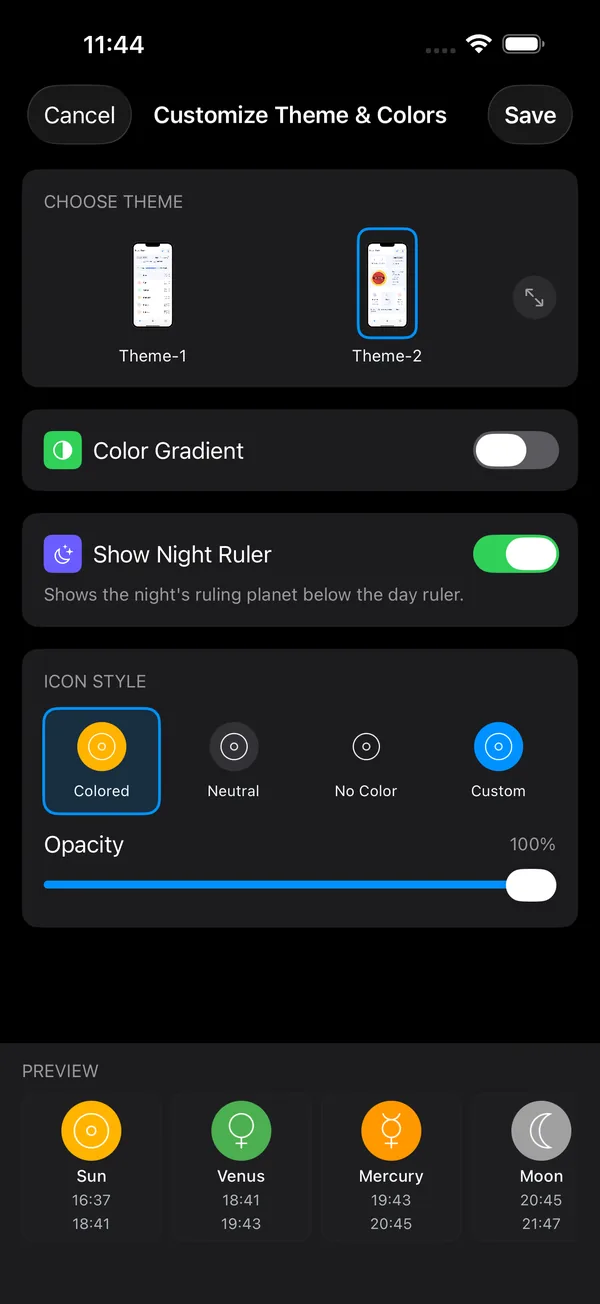
- Show Night Ruler toggle in Customize Theme & Colors
- Ruling planet icons back on the main screen day and night ruler lines
- Notifications moved into Settings and are no longer a tab
What is the Planner tab in Planetaro?
The Planner is Planetaro's fourth tab, and it works backwards from the question most people actually have: not "which planet rules this hour?" but "when is the good hour for this?"
Pick three things and the Planner does the rest:
- A date. A one-row week strip scrolls through the weeks, and a calendar button opens the full month grid.
- A city. Choose your current location, one of your favourites, or search on the map. The Planner never changes the app's saved location, so browsing another city does not disturb your home screen.
- An activity. Love, Work, Friends, Focus, Energy, and Family. Each activity maps to the planets traditionally considered favourable for it, and the matching hours are highlighted in the day's hour list.
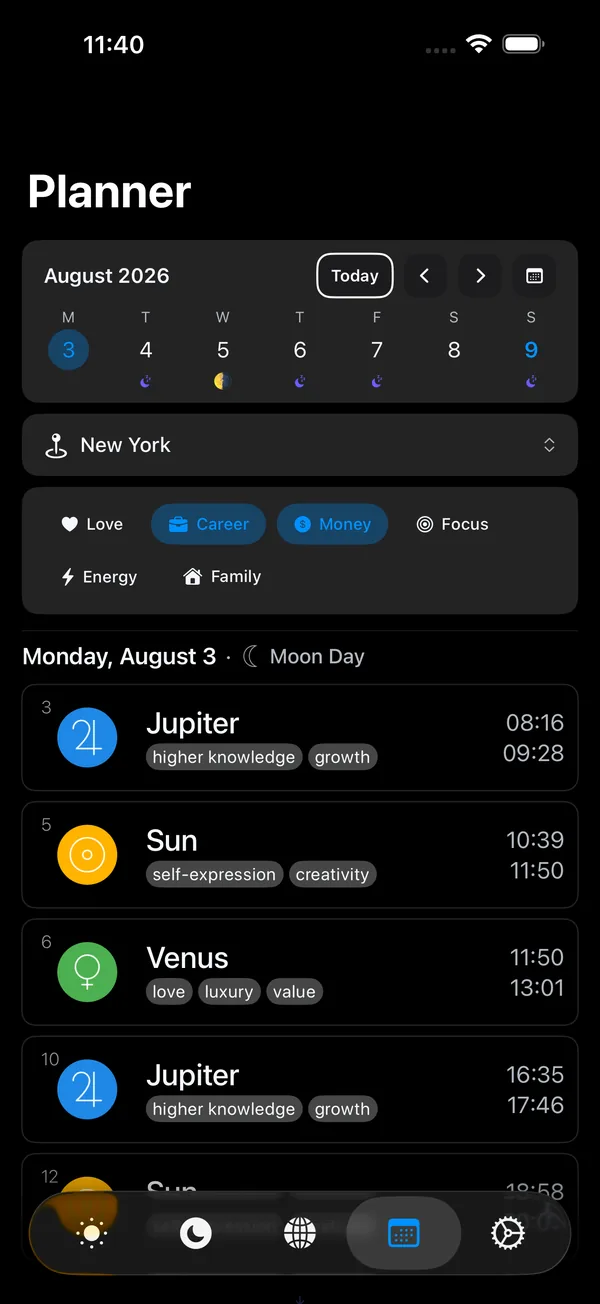
The result reads as one line: the date and the day ruler together, for example "Monday, August 3, Moon Day". Sunrise and sunset are already marked in the hours list, every hour carries the keywords of its planet such as love, luxury, and value for Venus, and a Today button appears whenever the selection has drifted away from the current day.
How does the Planner show Void of Course periods?
A Void of Course Moon is the stretch between the Moon's last major aspect in a sign and its entry into the next sign. It is traditionally treated as a poor window for starting anything new, which makes it exactly the kind of thing a planner should surface.
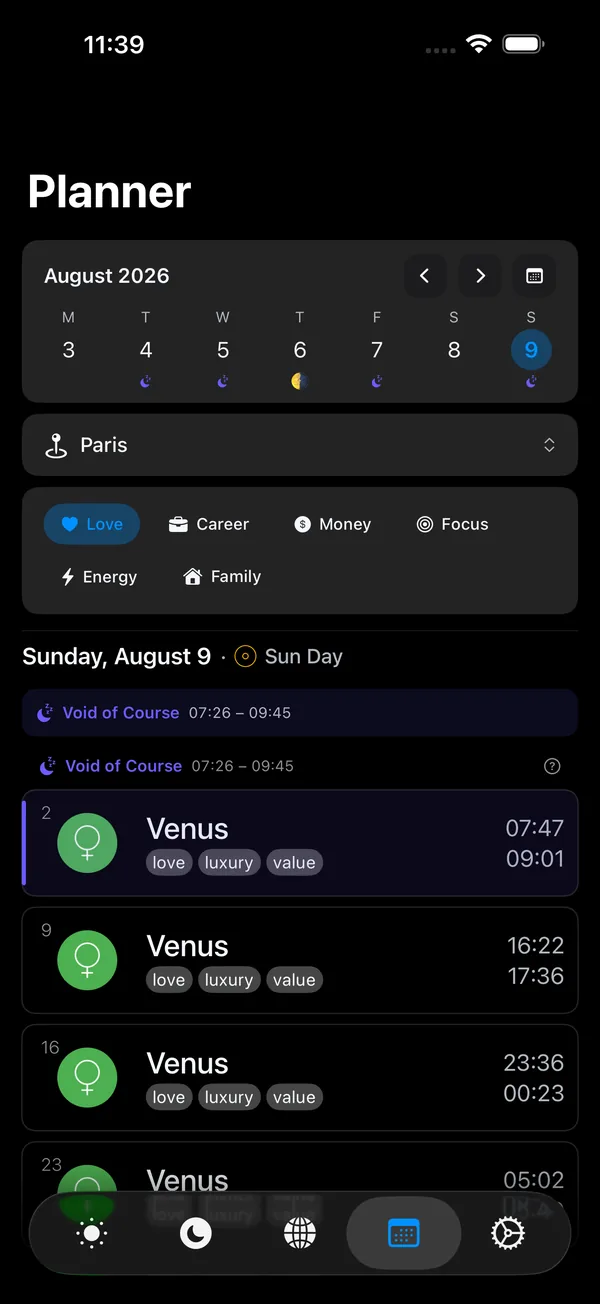
In Planetaro 2026.3, hours that fall inside a Void of Course window are shaded with a moon tint and marked with an indigo bar, and the band opens with a "Void of Course" marker showing the exact start and end times. A question mark next to the marker explains what a Void of Course Moon is, in all seven app languages. The month grid marks Void of Course days with a small indigo moon under the date.
Planetaro 2026.3.1 adds a dedicated Void of Course card to the Planner. The card answers the two cases the hour list could not show on its own: whether a Void of Course period started the day before and is still running, and whether one starts today and continues into the next day.
What is the World Hours map?
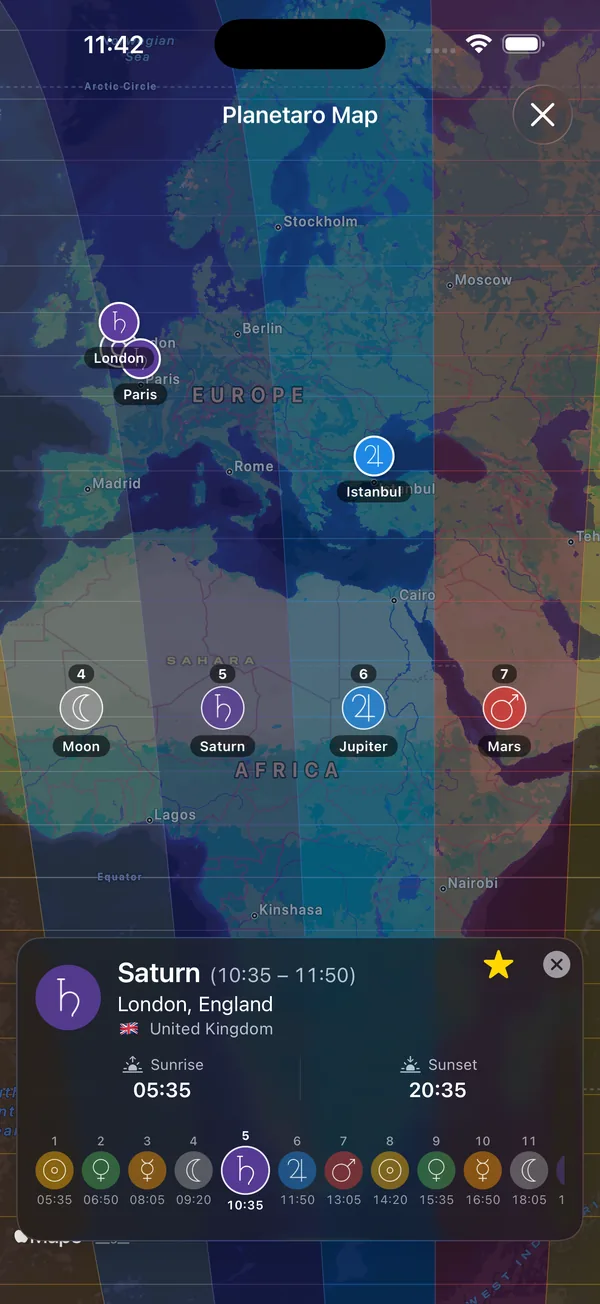
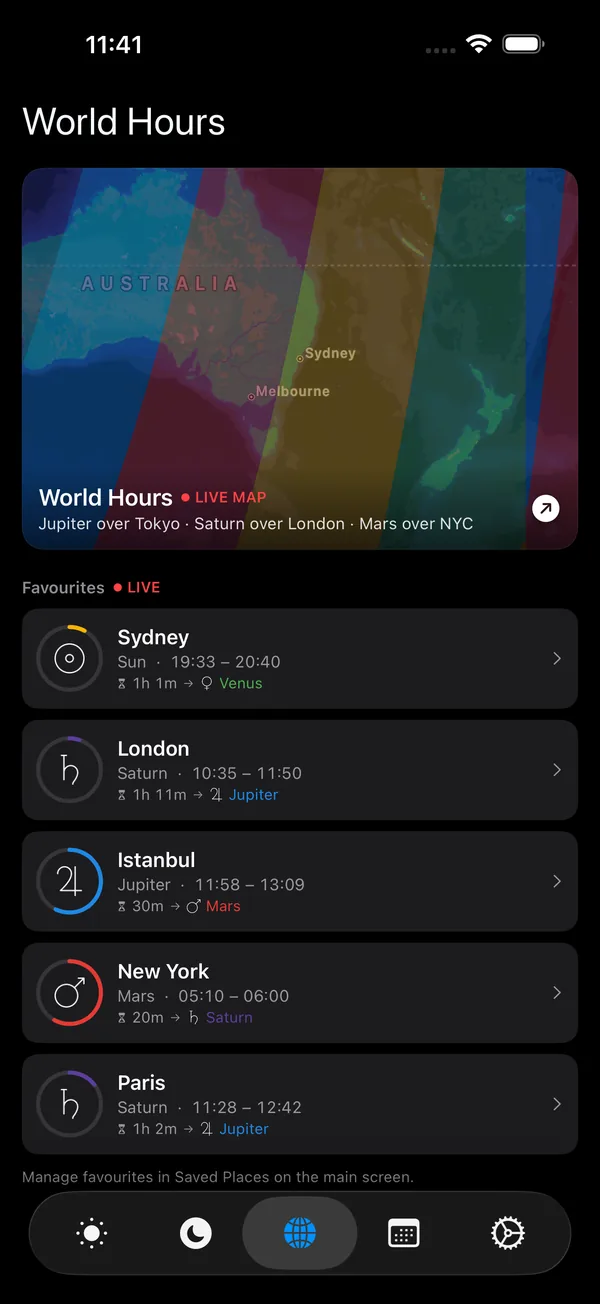
The World Hours map is an interactive map of the Earth coloured by which planet rules each region at this moment. Because planetary hours depend on local sunrise and sunset, the ruling planet changes as you move across the globe, and the map makes those bands visible at a glance.
In Planetaro 2026.3 the map is promoted to its own tab, marked with a globe icon.
What is new on the World Hours map in 2026.3?
- Favourite cities appear as pins. Each pin shows that city's current ruling planet, with the planet's icon and colour, and updates when the hour rolls over.
- Tap a pin to open that location. The tap snaps to the pin's exact coordinates instead of falling through to the map underneath.
- Star to favourite, everywhere. The star icon is now the single favourite control across the map, Saved Places, and the World tab, and it toggles instantly.
- Polar regions are filled. Colour used to stop at roughly 60 degrees latitude in summer, because above that line the sun does not set and there is no terminator to draw. The map now extends the outermost band up to the polar circle.
What changed on the Moon screen?
Which zodiac sign will the Moon be in at the next full moon?
Planetaro 2026.3 answers that on the card itself. Every upcoming phase now carries the zodiac sign the Moon will be in at that moment, so a phase row reads as one line: the phase glyph, how long until it, and the sign, for example a full moon in 4.5 days in Libra.
Making room for the sign meant shortening the countdown. "4 days, 14 hours" is now "4.5 days", anything under a day is shown in whole hours, and anything under an hour in minutes. The decimal separator follows your language, so the same figure reads as 4,5 días in Spanish. The change applies to the Moon screen's phase cards, the home screen Moon widget, the large Pro widget's next new moon and full moon rows, and the lock screen rectangular widget.
How do I change the date on the Moon screen?
Planetaro 2026.3.1 makes the Moon screen navigable by day. Arrows step forward and back one day at a time, and tapping the date in the middle opens the calendar to jump to any date. The hourly scrubber is still there for fine tuning within a day, but moving a week ahead no longer means dragging through 168 hours.
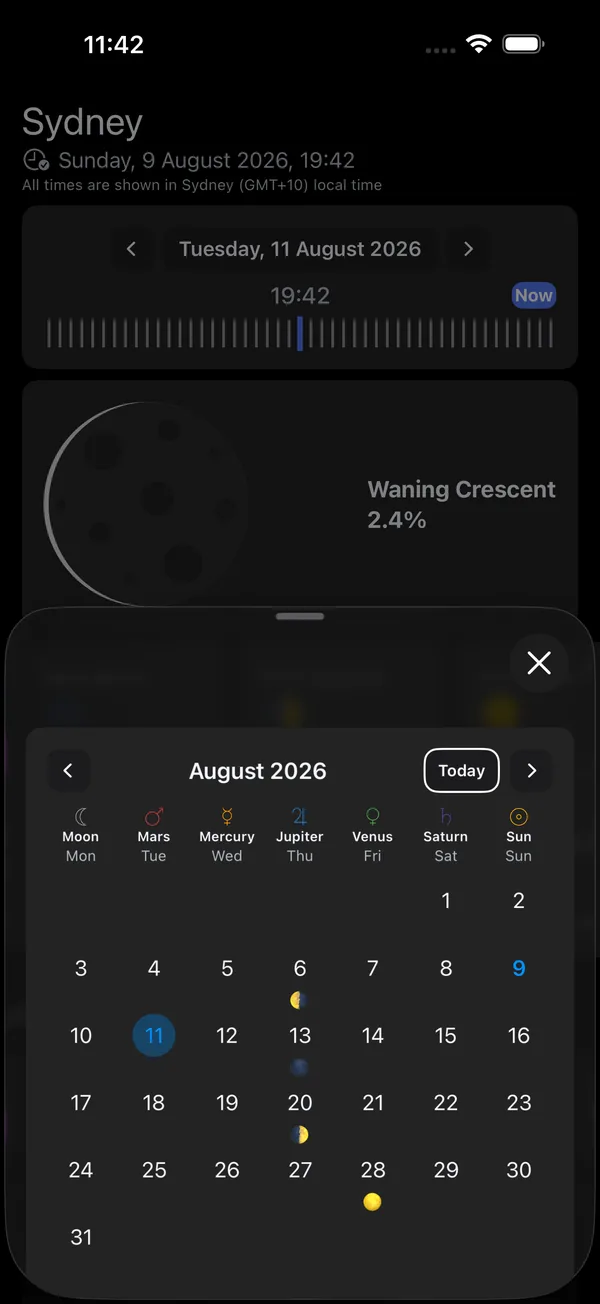
Every relative figure on the Moon screen is now anchored to the date you are looking at rather than to right now. Phase countdowns, the moon sign's remaining time, and the upcoming phase row all count from the displayed date, which fixes an empty phase row and wildly wrong countdowns when browsing far into the future.
What is Planetaro Talk?
Planetaro Talk is Planetaro's own podcast, and 2026.3.1 brings it inside the app. Open Settings and then Community to find the episode list, tap an episode for its full description, and watch on YouTube. Episode dates are shown as published, independent of the location you have selected in the app, and long descriptions collapse behind a Read more link.
A dismissible teaser card appears under the day summary on the main screen when a new episode is out, on both main screen themes. The episode feed is cached, so the list still opens without a connection.
Each episode screen carries its thumbnail, publication date, a Watch on YouTube button, the description, and the host and guests with links to their own channels.
Main screen and Settings changes
How do I hide the night ruler in Planetaro?
Open Settings, then Customize Theme & Colors, and turn off Show Night Ruler. The toggle is on by default. With it off, the main screen shows only the day's ruling planet, which some users found clearer than seeing a second line such as "Moon Night" alongside it.
The ruling planet's icon is also back on the main screen. The "Jupiter Day" and "Moon Night" lines carry a 20 point monochrome planet icon again, matching the Ruler of the Hour card.
Where did the Notifications tab go?
Notifications are no longer a tab. Planetaro 2026.3 moves them into Settings, where they sit in their own section. Notifications are a configure once screen, and the tab bar was better spent on the new Planner and World tabs.
Languages
Planetaro is fully localized in seven languages: English, Turkish, Arabic, Japanese, Chinese (Simplified), French, and Spanish. Every string added in 2026.3 and 2026.3.1, including the Void of Course explanation, the activity names, and the night ruler toggle, ships in all seven.
Frequently Asked Questions
What version of Planetaro is this page about?
This page covers Planetaro 2026.3 and the follow-up update 2026.3.1, released on 5 August 2026 for iOS and Android. The two are documented together because 2026.3.1 refines features introduced in 2026.3.
What does the Planner tab do in Planetaro?
The Planner tab finds favourable planetary hours for a specific activity. You choose a date, a city, and an activity from Love, Work, Friends, Focus, Energy, or Family, and the Planner highlights the hours ruled by the planets traditionally associated with that activity, along with sunrise, sunset, and any Void of Course periods.
What is a Void of Course Moon?
A Void of Course Moon is the period between the Moon's last major aspect in one zodiac sign and its entry into the next sign. Traditional astrology treats it as an unfavourable window for beginning new projects. Planetaro shades Void of Course hours in the Planner, marks Void of Course days in the month grid, and shows a card for periods that cross midnight.
Does the World Hours map work for any city?
Yes. The World Hours map colours the whole globe by ruling planet and lets you tap anywhere to inspect that location. Cities you have starred as favourites appear as pins showing their current ruling planet, and tapping a pin opens that location directly.
Can I turn off the night ruler on the Planetaro main screen?
Yes. Go to Settings, then Customize Theme & Colors, and turn off Show Night Ruler. The setting is on by default and applies to both main screen themes.
Where do I find the Planetaro Talk podcast in the app?
Planetaro Talk is under Settings and then Community. The screen lists every episode, and tapping one opens its description with a link to watch on YouTube. A teaser card also appears on the main screen when a new episode is published. Every episode is also listed on the Planetaro website at planetaro.com/podcast.
Are all 2026.3 features on both iOS and Android?
The Planner tab, the World Hours map, moon sign transitions, the move of Notifications into Settings, and Planetaro Talk are available on both iOS and Android. The 2026.3.1 refinements, namely the Show Night Ruler toggle, Moon day navigation, and the Planner's Void of Course card, land on iOS first and follow on Android.
Is Planetaro free?
Planetaro is free to download on the App Store and Google Play. Some features, including the full interactive World Hours map and the Pro widgets, are part of Planetaro Pro.
Download
Planetaro 2026.3 is available now on the App Store and Google Play.
Bug fixes and performance improvements included.